Using NMRium for teaching
NMRium teaching
NMRium is likely the best platform for teaching structure elucidation to students. You can already look at existing series of exercises through the following links:
- https://app.nmrium.com/teaching/exercises#?toc=https://cheminfo.github.io/nmr-dataset2/toc.json
- https://app.nmrium.com/teaching/exercises#?toc=https://cheminfo.github.io/nmr-dataset-nils/toc.json
- https://app.nmrium.com/teaching/exercises#?toc=https://cheminfo.github.io/nmr-dataset-jgumainz/toc.json
Creating your own series
Creating your own series of exercises is relatively easy but you should be a little bit familiar with GitHub.
If you do not have a GitHub account yet, you can easily sign up there. You can register for free here.
The first step is to use the following project as a template: https://github.com/cheminfo/nmr-dataset-template. You will be redirected to the GitHub page. Click the Use this template button, and in the box that opens click Create a new repository.

Then click on the button "Create repository". The basic structure of your exercise will be created.
A GitHub page will open. Click on the "Include all branches" box. You have to give your exercise a name, which you enter at "Repository name". You also have to select the setting "Public". Then click on the button "Create repository". The basic structure of your exercise will be created. Next, you need to create your own exercise.
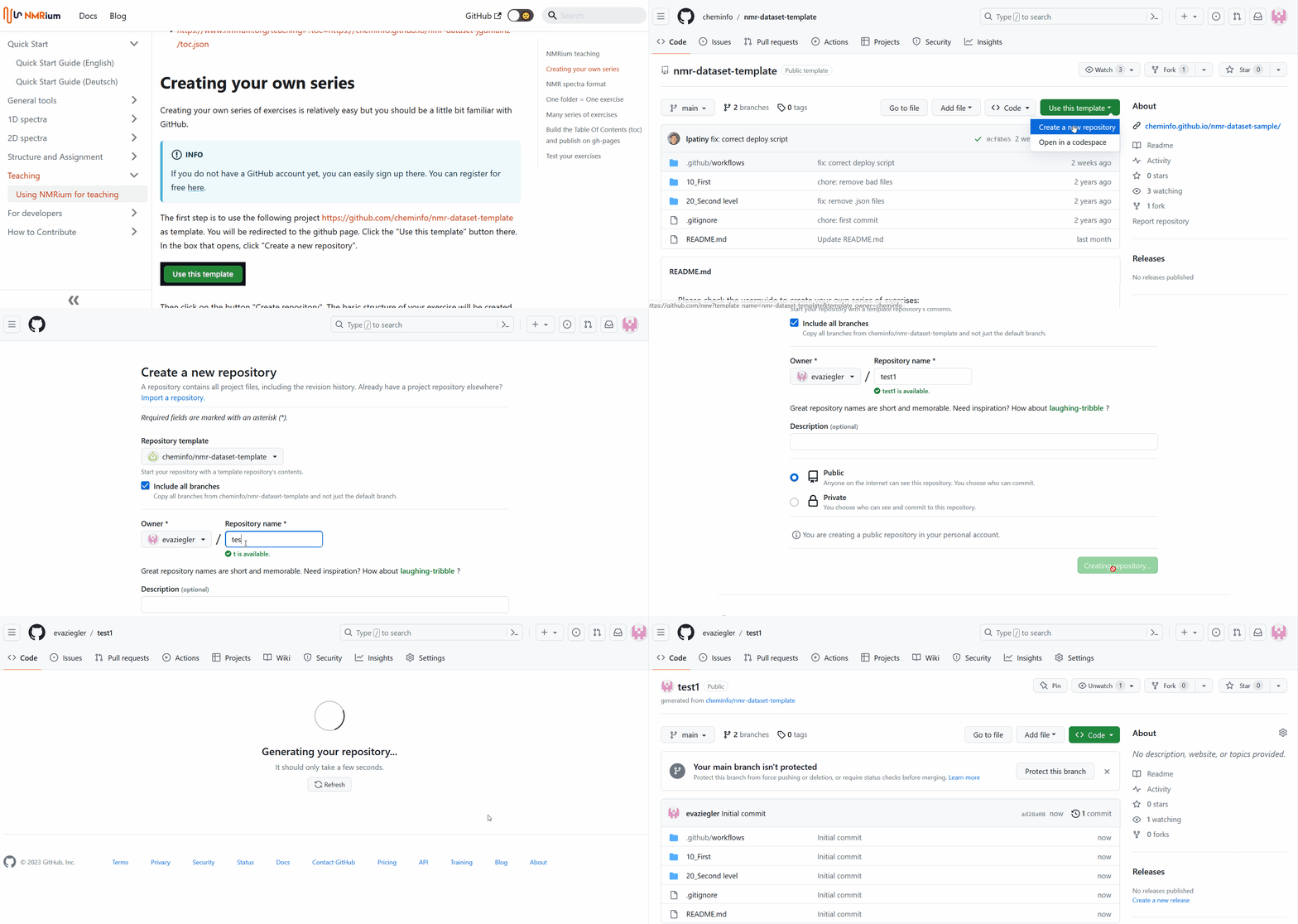
To make changes to the repository created from the template, we recommend to work with the software Visual Studio Code which is available for free here. If you do not have this program installed on your computer, you can also work with the browser version. Open your repository on GitHub and press the . key on the keyboard. You will be automatically directed to the browser version of Visual Studio Code. It may take a few moments until all functions are usable.
GitHub has provided a basic structure for the exercise.
You may then change all the files and folders (except the .github folder required to build the series). You have the possibility to group exercises in folders or have them directly at the first level.
If you want to create or rename folders, click the Explorer button on the menu bar on the left side of Visual Studio Code. To create a new folder, click the New Folder icon, then label the folder and press Enter. To rename an existing folder, right-click it and choose Rename, specify the new name, and press Enter. To delete an existing folder, right-click it, choose Delete permanently, then click Delete in the confirmation box.
To save the changes, click the Source Control button on the menu bar on the left. All the changes you have made are shown there. Write a short commit message in the message box, then click the check mark above the box. The process may take a few minutes. Your changes will be committed directly to the main branch on GitHub.
Now you need to switch back to the GitHub page. If you are using the browser version of the Visual Studio code, click the button at the top right. Click the "Switch to repository" button there. You will be redirected to GitHub.
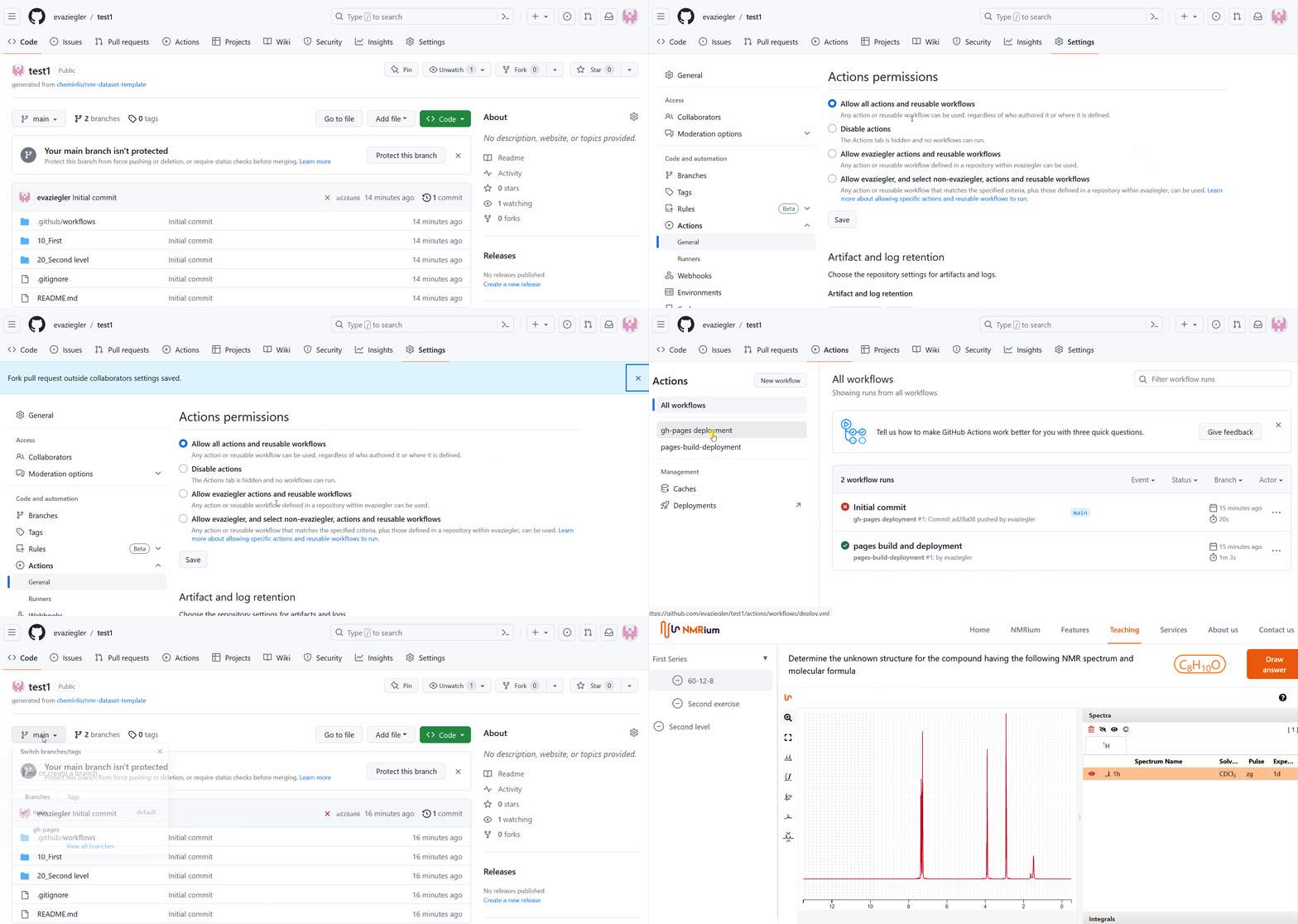
Now click the Settings button in the bar at the top center. Then click Actions on the left side of the page and go to General. You need to select the following settings:
- Allow all actions and reusable workflows
- Require approval for first-time contributors
- Read and Write permissions
For all three settings you have to click the respective "Save" button. Now click the "Actions" button in the bar above the workspace, then click gh-pages deployment. On the right side of the workspace you will now find the button "Run workflow", which you also have to click. GitHub will now apply all the settings you have chosen and save them. This step may take a few minutes. You can perform all further steps, but you may not be able to view your correct exercises until a few minutes later (see last step).
Now click the Code button in the upper left corner. You will be redirected to your exercise.
Click the main button in the upper left corner and then on gh-pages. Your exercise will be created.
In the README.md box at the bottom of the workspace, click the link to your exercises on GitHub or copy it and forward it to your students. Depending on the size of your created exercises, it may take a few minutes for NMRium to display the correct exercises.
NMR spectra format
You should save the NMR spectra as JCAMP-DX files (on TopSpin, use the tojdx command). The spectra should be FT and phase corrected. To save bandwidth, you can store only the real part of the spectrum.
One folder = One exercise
There are three folder levels on GitHub or Visual Studio Code when building your own exercise series. The first level contains the .github folder and individual chapters for series of exercises (so-called Tables of Contents, or tocs) — e.g. Chapter 1 Exercises for Beginners and Chapter 2 Exercises for Experts. Each chapter contains second-level folders where you set up the different exercises (molecules). Each exercise, at the third level, contains one or more spectra and the corresponding molfile. You can add as many spectra per molecule as you want.
For each exercise (second level) you want to create you can add the following files (third level):
- structure.mol : mandatory, the chemical structure of the answer
- 1h.jdx
- 13c.jdx
- 13cdec.jdx
- cosy.jdx
- hsqc.jdx
- hmbc.jdx
- deptXXX.jdx
- aptXXX.jdx
- ...
Only folders that contain an answer (file structure.mol as a molfile) will be processed.
By default we expect that the JCAMP files contain only the processed data. If you would like to provide FID, or FID + FT data, please use the following convention:
- 1h.fid.jdx
- 1h.full.jdx
Many series of exercises
While the action generates a Table of Contents (toc) for all the exercises, one toc is also generated per folder.
The name of the toc for each folder is toc_ABCD.json, where ABCD is the name of the folder. Only folders present at the first level are considered.
Test your exercises
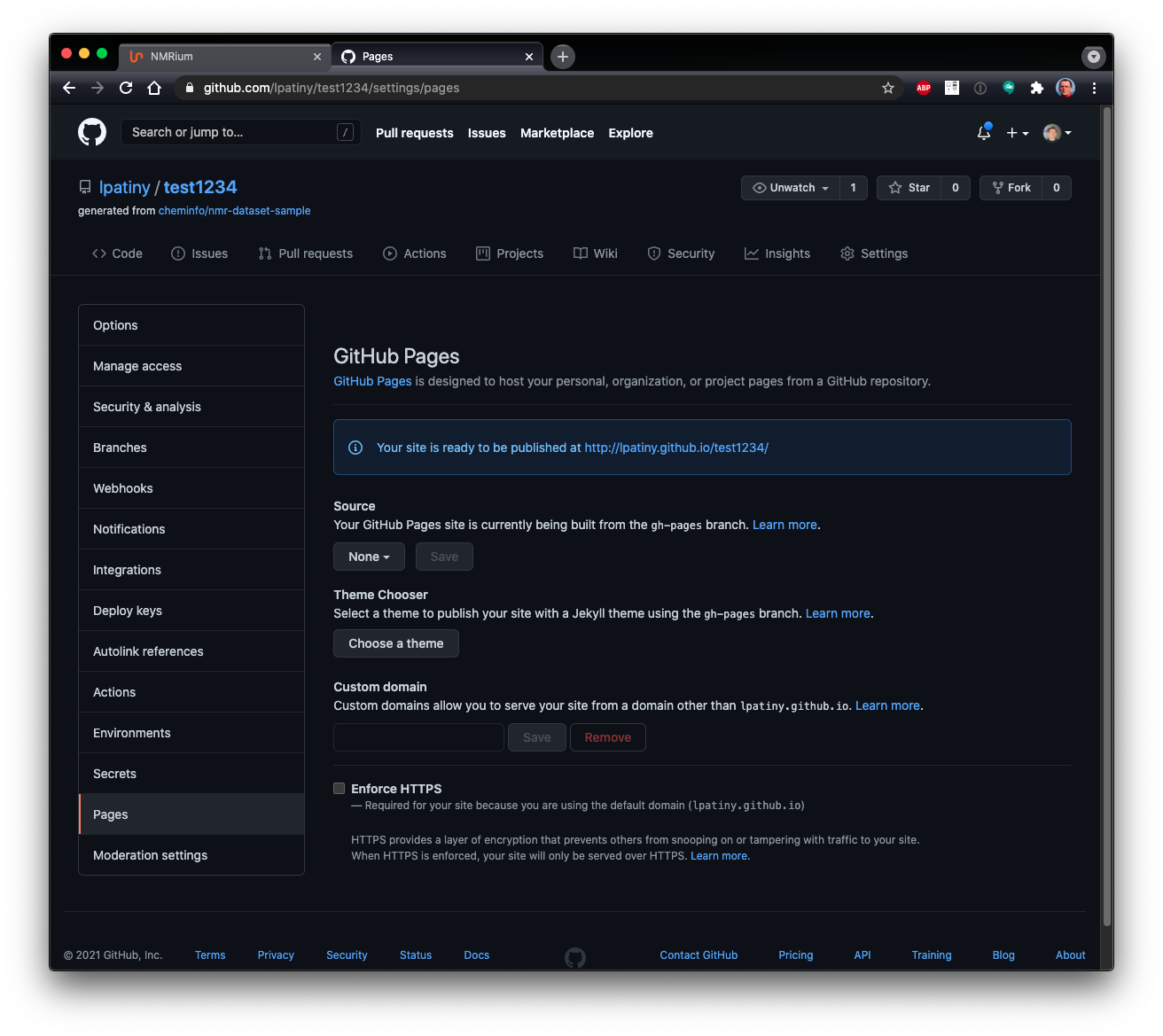
In order to find the URL of your repository you should open the settings of your project and click on the left on Pages. You will then see the URL on which the data are published.
Technically there is a GitHub action (present in .github/deploy/workflow.yml) that will add various JSON files containing the list of exercises, calculate the molecular formula and generate a secret key corresponding to the answer. This action will publish your website on a branch gh-pages that is publicly available on the internet.